Skip to content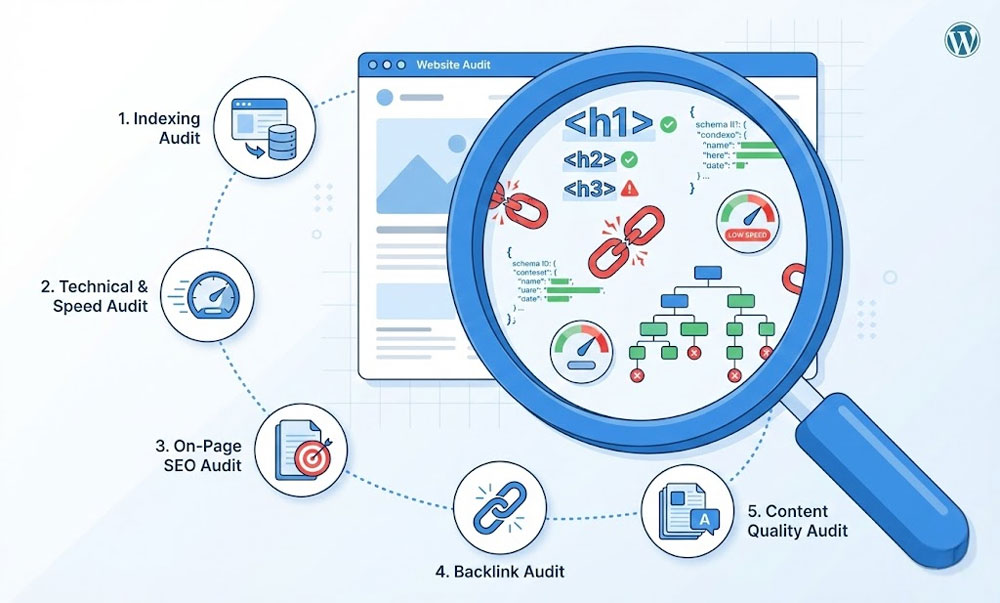
A chiropractor in Dallas asked me to audit his WordPress site last November. He’d been blogging twice a week for eight months, had 64 published posts, and his organic traffic was still under 200 monthly visits. He assumed he needed backlinks. The audit revealed something much simpler: 41 of his 64 blog posts weren’t indexed by Google. His XML sitemap was submitting them, but the posts were so thin (150-300 words each) that Google was choosing not to index them. On top of that, 12 posts were cannibalizing each other by targeting identical keywords, his site had no internal linking structure whatsoever, and his homepage had zero schema markup. The backlinks weren’t the problem. The foundation was.
That’s what an SEO audit does. It finds the actual problems, not the problems you assume you have. This guide walks through a complete DIY audit using only free tools. It covers the five areas that account for 90% of SEO issues I find across 400+ Upwork projects. Some issues you’ll fix yourself. Others will show you exactly where professional help would make the biggest impact.
What You’ll Need (All Free)
Google Search Console. The single most important SEO tool. If you don’t have it set up, stop reading and set it up now. It shows you exactly what Google sees: which pages are indexed, which have errors, what keywords you’re appearing for, and what Core Web Vitals data Google is using for your rankings. If you need setup help, my technical SEO service includes GSC configuration.
PageSpeed Insights (pagespeed.web.dev). Tests page speed and Core Web Vitals. Shows both lab data (simulated) and field data (real users). Run it on your homepage, your most important service page, and your highest-traffic blog post.
Screaming Frog SEO Spider (free version). Desktop crawler that scans up to 500 URLs free. It finds broken links, missing meta tags, duplicate titles, thin content, redirect chains, and structural issues. Download from screamingfrog.co.uk. Enter your domain and click Start.
Google Rich Results Test (search.google.com/test/rich-results). Tests whether your pages have valid schema markup that qualifies for rich snippets in Google search results.
Your browser (Chrome DevTools). Right-click any page > Inspect. The Elements, Network, and Performance tabs reveal issues invisible to the naked eye. No installation needed.
Total cost: $0. Total time: 2-4 hours for a site under 100 pages.
Step 1: Indexing Audit – Are Your Pages Actually in Google?
This is the most important step. Pages that aren’t indexed don’t exist to Google. They get zero organic traffic regardless of how well-written they are.
Check index coverage in Search Console. Navigate to Pages (formerly Index Coverage). You’ll see four categories: Indexed (pages Google has accepted into its search index), Not Indexed (pages Google knows about but has chosen not to index), Errors (pages Google tried to index but couldn’t due to server errors or access issues), and Excluded (pages intentionally or unintentionally excluded from the index).
What to look for. Compare your total indexed pages against how many pages your site actually has. If you have 50 pages and Google shows 30 indexed, 20 pages are invisible. Click into “Not Indexed” to see why. Common reasons:
“Discovered, currently not indexed” means Google found the URL but hasn’t bothered indexing it. Usually indicates thin content (pages with under 300 words of unique content), low perceived value, or crawl budget prioritization. Fix: improve content depth on these pages or consolidate thin pages into fewer comprehensive ones.
“Crawled, currently not indexed” means Google downloaded the page, evaluated it, and decided not to include it. This is worse than “discovered” because Google actively rejected it. Fix: significantly improve content quality, add internal links from authoritative pages, and ensure the content provides unique value not found elsewhere on your site or competitors’.
“Excluded by robots.txt” or “Blocked by robots.txt” means your robots.txt file is preventing Google from accessing these pages. Sometimes intentional (admin pages, staging), sometimes accidental (entire directories blocked by mistake). Check your robots.txt at yourdomain.com/robots.txt and verify nothing important is blocked.
“Alternate page with proper canonical tag” means Google is consolidating duplicate pages to the canonical version. This is usually correct behavior. Verify the canonical is pointing to the right page.
The quick check. Search Google for “site:yourdomain.com” and count the results. Compare this number to your total page count. A large discrepancy indicates indexing issues.
Sitemap verification. In Search Console > Sitemaps, verify your XML sitemap is submitted and shows no errors. Click into the sitemap to confirm the page count matches your expectations. If using RankMath, your sitemap is at yourdomain.com/sitemap_index.xml. Verify it includes all pages you want indexed and excludes pages you don’t (cart, checkout, my account, tag archives, date archives).
Step 2: Technical and Speed Audit
Technical issues prevent Google from properly crawling, understanding, and ranking your content. Speed issues directly affect user experience and Core Web Vitals ranking signals.
Screaming Frog crawl. Open Screaming Frog, enter your domain URL, click Start. Wait for the crawl to complete (under 500 pages takes 1-5 minutes). Then check:
Response codes tab. Filter by 4xx (broken pages) and 5xx (server errors). Every 404 page that has internal links pointing to it is a broken link leaking authority and creating a bad user experience. Export the list. Fix by either creating content at those URLs or adding 301 redirects to relevant existing pages. RankMath’s built-in redirect manager handles this without additional plugins.
Page titles tab. Sort by “Duplicate” to find pages sharing the same title tag. Every page needs a unique title. Duplicate titles confuse Google about which page should rank for the keyword. Sort by “Missing” to find pages with no title tag at all. Sort by character count and flag titles over 60 characters (Google truncates them in search results) or under 30 characters (likely too generic).
Meta descriptions tab. Same process: check for duplicates, missing descriptions, and descriptions over 160 characters or under 70 characters. While meta descriptions aren’t a direct ranking factor, they directly affect click-through rate from search results. A compelling description increases CTR. A missing description means Google auto-generates one, which is often suboptimal.
H1 tags tab. Every page should have exactly one H1 tag. Check for pages with zero H1 tags (common with Elementor pages where the designer used styled text instead of proper heading elements), pages with multiple H1 tags (confusing heading hierarchy), and pages with duplicate H1 tags across the site.
Speed test. Run PageSpeed Insights on your 3 most important pages. Check the field data section for Core Web Vitals. If any metric shows orange or red, refer to the speed optimization guide for specific fixes. Common WordPress speed issues: unoptimized images (most frequent), too many plugins loading JavaScript on every page, no caching plugin installed, cheap shared hosting with 600ms+ TTFB, and render-blocking CSS/JavaScript.
SSL check. Your entire site must load over HTTPS. Check for mixed content warnings (pages loading some resources over HTTP). Screaming Frog > Security tab shows mixed content issues. Every page, every image, every script, every stylesheet must use HTTPS. The technical SEO checklist covers SSL verification in detail.
Step 3: On-Page SEO Audit
On-page SEO determines whether Google understands what each page is about and considers it relevant for target keywords. This is where most DIY sites fail because the content exists but isn’t optimized for search.
Keyword mapping. Create a simple spreadsheet: Page URL, Target Keyword, Current Title Tag, Current H1. Fill this in for every important page. Then check:
Does every page target a unique primary keyword? If two pages target the same keyword, they compete against each other (cannibalization). The chiropractor I mentioned had 12 posts all targeting “back pain treatment.” Google didn’t know which to rank, so it ranked none of them. Consolidate competing pages into one comprehensive page or differentiate their target keywords. My on-page SEO service includes complete keyword mapping and cannibalization resolution.
Does the target keyword appear in the title tag, H1, first 100 words, and URL slug? These four placements signal relevance to Google. A page targeting “plumber in Austin” with a title of “Our Services,” an H1 of “What We Do,” and a URL of /services/ is invisible for that keyword despite potentially great content.
Content depth. Check word counts for your most important pages. While there’s no magic number, pages competing for commercial keywords typically need 1,000+ words to be comprehensive enough to satisfy search intent. Blog posts targeting informational keywords typically need 1,500-3,000+ words. Pages under 300 words are frequently flagged as thin content by Google.
Internal linking. Click through your site and note how pages connect to each other. Every page should have at least 3-5 internal links pointing to it from other relevant pages. Orphan pages (pages with zero internal links) are hard for Google to discover and signal low importance. The 15 WordPress mistakes post covers internal linking as a critical oversight.
Schema markup. Test your homepage, a service page, and a blog post at search.google.com/test/rich-results. At minimum, your site should have: Organization or Person schema site-wide, Article schema on blog posts, and FAQPage schema on pages with FAQ sections. Product schema on e-commerce products. LocalBusiness schema if you serve a local area. Missing schema means missing opportunities for rich snippets in search results, which increase click-through rates by 20-30%. RankMath handles all of these schema types for free.
Image optimization. Check 10 random images on your site: do they have descriptive alt text? Are they WebP format? Are they sized appropriately (not 3000px wide for a 800px container)? Missing alt text is the most common image SEO issue, affecting both accessibility and Google Image search visibility.
Step 4: Backlink and Authority Audit
Backlinks remain one of the strongest ranking factors. This step evaluates your site’s external link profile.
Free backlink check. Google Search Console > Links shows your total external links, top linking sites, and top linked pages. This data is limited but free and comes directly from Google. For more detail, use Ahrefs Webmaster Tools (free for site owners, limited data) or Moz Link Explorer (free, 10 queries per month).
What to evaluate. Total referring domains (unique websites linking to you). More referring domains generally correlate with higher rankings. Quality over quantity: one link from a relevant industry publication is worth more than 100 links from random directories.
Toxic backlinks. Look for links from: obviously spammy domains (gambling, pharma, adult content unrelated to your business), foreign-language sites with no relevance to your business, PBN-style sites (thin content, no real traffic, exist only to sell links), and automated directory submissions. If you find genuinely toxic backlinks, use Google’s Disavow tool. But be conservative because disavowing legitimate links hurts you. When in doubt, leave it alone.
Competitor comparison. Search your target keywords and note who ranks above you. Check their backlink profiles using the same free tools. If competitors have 50-100 referring domains and you have 5, content quality alone won’t close the gap. You need a link building strategy. If competitors have similar backlink profiles and still outrank you, the issue is likely on-page optimization or technical SEO, not backlinks.
Step 5: Content Audit
Content is what Google ultimately ranks. This step evaluates whether your content deserves to rank.
Content inventory. List every page and post with: URL, word count, target keyword, monthly organic traffic (from Search Console), and last updated date. Sort by traffic. Pages with zero traffic after 6+ months of being published need attention.
Content quality evaluation. For each underperforming page, ask: Does it answer the search intent better than the current top 3 results for this keyword? Is the information current and accurate? Does it provide unique value (original data, professional experience, specific examples) or just rehash what every other result says? Is it comprehensive enough to fully satisfy someone searching this keyword?
Content consolidation. Identify pages targeting similar keywords or covering overlapping topics. Instead of 5 thin posts about related subtopics, create 1 comprehensive guide that covers everything and redirect the thin posts to it. The chiropractor consolidated 12 thin “back pain” posts into 3 comprehensive guides. Each guide now ranks for 15-20 keywords instead of each thin post ranking for zero.
Content gaps. Search your target keywords. What are competitors writing about that you haven’t covered? What questions appear in “People Also Ask” that your site doesn’t answer? Each gap is an opportunity. A blog content strategy fills these gaps systematically over 6-12 months.
Freshness check. Sort your content by last updated date. Pages last updated over 12 months ago with declining traffic may need refreshing. Update statistics, add new sections, improve internal linking, and republish with the current date. Google rewards fresh, updated content for queries where recency matters.
DIY Audit vs. Professional Audit
This guide covers the five highest-impact audit areas. It’s genuinely useful and will reveal real issues on most sites. But here’s what a DIY audit doesn’t cover that a professional 17-report audit does:
Competitor analysis. Who ranks for your target keywords, what they’re doing differently, and where the gaps are in their strategy that you can exploit. This requires paid tools (Ahrefs, Semrush) and experience interpreting the data.
Keyword gap analysis. Keywords your competitors rank for that you don’t. This reveals content opportunities you’d never find by looking at your own data alone.
Content strategy. A 12-month editorial calendar based on keyword research, search volume, competition levels, and your site’s current authority. Not random blog posts but a structured plan targeting specific ranking milestones.
Backlink gap analysis. Where competitors are getting links that you’re not. Specific outreach targets based on relevance, authority, and likelihood of success.
Koray Tugberk semantic SEO analysis. Entity relationships, semantic triples, contextual vectors, and topical authority structures that go beyond traditional keyword optimization. This is the methodology I apply to every SEO project and it’s what separates ranking on page 1 from ranking positions 1-3.
Full technical depth. Server log analysis, JavaScript rendering verification, international targeting, cross-template schema validation, and advanced crawl budget optimization for large sites.
The DIY audit catches 60-70% of issues. The professional audit catches 95%+ and includes the strategic roadmap to fix everything in priority order. My professional SEO audit delivers 15 DOCX/XLSX reports plus 2 markdown summaries, takes 5-8 business days, and includes a 12-month action plan.
Frequently Asked Questions
How often should I do an SEO audit?
Comprehensive audit: annually or after major site changes (redesign, migration, new product lines). Quick health checks (indexing, speed, broken links): quarterly. Google Search Console monitoring: weekly. Most sites benefit from professional audits once per year with quarterly DIY checks between.
Can I do an SEO audit without paid tools?
Yes for the fundamentals. Google Search Console, PageSpeed Insights, Screaming Frog (free 500 URLs), and Google Rich Results Test cover indexing, technical issues, speed, and schema. Backlink analysis and competitive research are limited without paid tools like Ahrefs or Semrush, which is where a professional audit adds the most value.
What should I fix first after an audit?
Priority order: (1) Indexing issues, because unindexed pages can’t rank at all. (2) Technical errors (broken links, redirect chains, missing H1s). (3) Speed and Core Web Vitals. (4) On-page optimization (titles, meta descriptions, schema). (5) Content improvements. (6) Backlinks. This matches the technical SEO checklist priority framework.
How long until I see results after fixing audit issues?
Technical fixes (indexing, speed, broken links): 2-4 weeks for Google to reprocess. On-page optimization: 1-3 months for ranking improvements. Content improvements: 2-6 months depending on competition. Backlink building: 3-6 months for measurable impact.
Is one audit enough or do I need ongoing SEO?
An audit identifies problems and creates a roadmap. Fixing everything and maintaining it requires ongoing work. Most businesses benefit from an initial comprehensive audit followed by quarterly health checks and ongoing content creation. My SEO services cover both one-time audits and ongoing optimization.
Ready for a Professional Audit?
This DIY guide gives you the foundation. When you’re ready for the full 17-report professional audit with competitor analysis, keyword gap research, content strategy, and a 12-month action plan, I deliver it as a fixed-price project on Upwork. Same process I’ve used across 400+ projects. 5-8 business day delivery.
Browse the portfolio, case studies, and reviews. Background on the about page. Related: technical SEO, on-page SEO, WordPress SEO, link building, speed optimization, WordPress development, WooCommerce, maintenance, and malware removal. Guides: technical SEO checklist, speed guide, Core Web Vitals, RankMath vs Yoast, and WordPress mistakes. Platform: WordPress vs Squarespace. FAQ. Contact.